 VoIPBin Documentation
Authentication
Every API request must be authenticated using either a Token (JWT string) or an Accesskey (API key string). Both serve the same purpose — choose whichever fits your workflow.
Note
AI Implementation Hint
Use Token (JWT) for short-lived, session-based authentication (valid for 7 days). Use Accesskey for long-lived, programmatic access with custom expiration. For automated systems and AI agents, Accesskey is recommended because it does not require periodic re-authentication.
Generate a Token
Send a POST request to /auth/login with your username (String) and password (String) to receive a JWT token. The token is valid for 7 days.
$ curl --request POST 'https://api.voipbin.net/auth/login' \
    --header 'Content-Type: application/json' \
    --data-raw '{
        "username": "your-voipbin-username",
        "password": "your-voipbin-password"
    }'
Response:
{
    "username": "your-voipbin-username",
    "token": "eyJhbGciOiJIUzI1NiIsInR5cCI6IkpXVCJ9..."
}
Use the token in subsequent API requests. See Using Credentials in API Requests below for usage examples.
Generate an Accesskey
For long-lived authentication, generate an access key. You can create one from the admin console or via the API.
Via Admin Console:
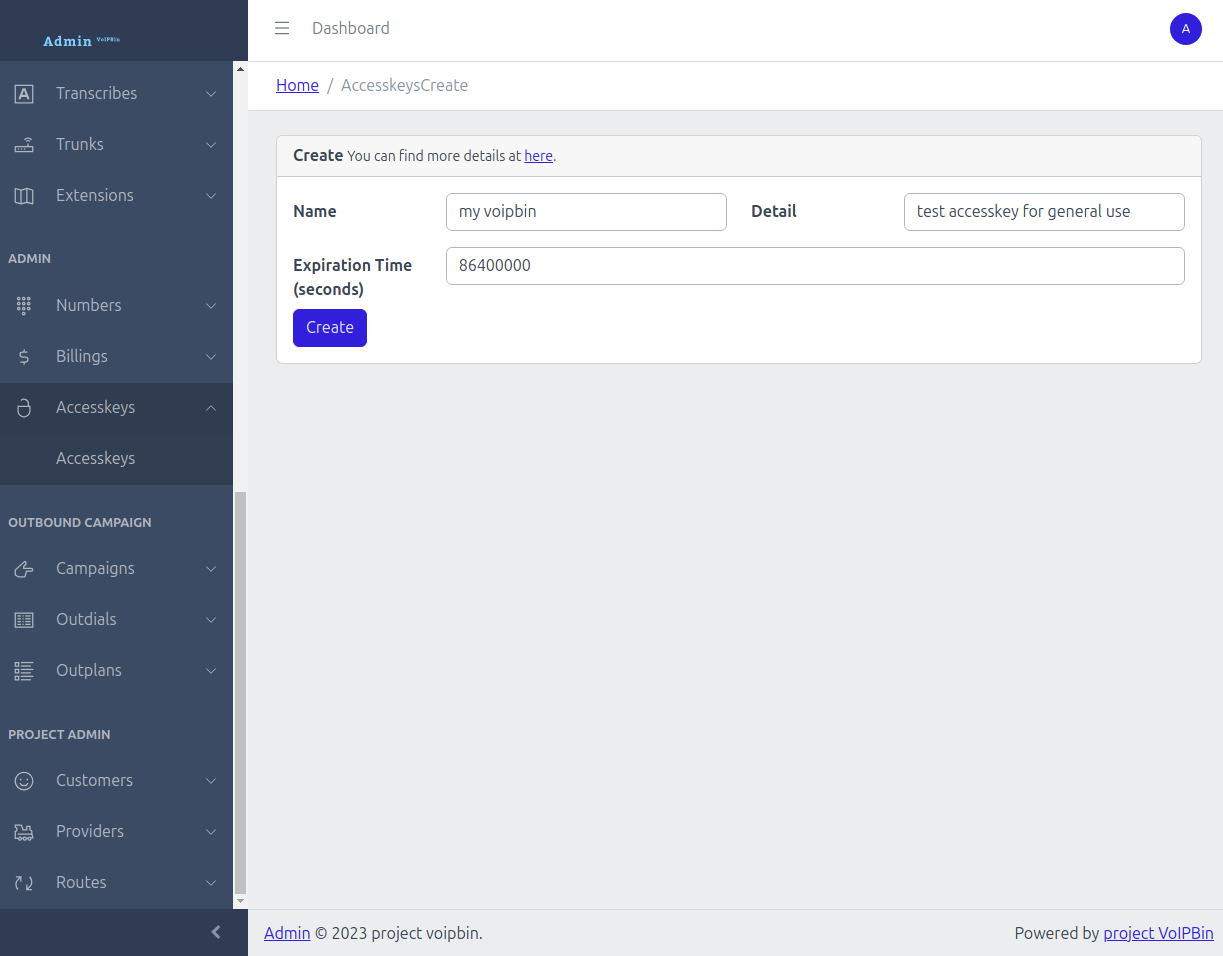
Via API:
$ curl --request POST 'https://api.voipbin.net/v1.0/accesskeys?token=<your-token>' \
    --header 'Content-Type: application/json' \
    --data-raw '{
        "name": "my-api-key",
        "detail": "API key for automated access"
    }'
Response:
{
    "id": "a1b2c3d4-e5f6-7890-abcd-ef1234567890",
    "token": "your-access-key-token",
    "name": "my-api-key",
    "detail": "API key for automated access",
    ...
}
Note
AI Implementation Hint
If you signed up via the API (POST /auth/signup), the response already includes an accesskey with a valid token — you do not need to create another one. Use POST /v1.0/accesskeys only if you need additional keys or want to set a custom expiration via the expire (Integer, Optional) field.
Direct Token (Boot)
For resource-scoped access without user credentials, use a direct hash to obtain a short-lived JWT. This is used for direct links (e.g., AI voice agent web widgets) where the end user does not have a VoIPBIN account.
Send a POST request to https://api.voipbin.net/auth/boot with the direct_hash (String, Required). The hash is obtained from a direct link URL or from the hash field of GET https://api.voipbin.net/v1.0/directs. Must start with direct..
$ curl --request POST 'https://api.voipbin.net/auth/boot' \
    --header 'Content-Type: application/json' \
    --data-raw '{
        "direct_hash": "direct.abc123def456..."
    }'
Response:
{
    "token": "eyJhbGciOiJIUzI1NiIsInR5cCI6IkpXVCJ9...",
    "type": "direct",
    "resource_type": "ai",
    "resource_id": "a1b2c3d4-e5f6-7890-abcd-ef1234567890",
    "customer_id": "c1b2c3d4-e5f6-7890-abcd-ef1234567890",
    "expire": "2026-04-06T20:00:00Z"
}
The returned token is valid for 4 hours and grants access only to the resource types associated with the direct hash (e.g., aicall for an AI direct hash). Use it in subsequent API and WebSocket requests via the ?token= query parameter.
Note
AI Implementation Hint
Direct tokens have limited scope — they can only access specific resource types (e.g., aicall), not the full API. For WebSocket subscriptions, direct tokens can only subscribe to 4-part topics: customer_id:<uuid>:<resource_type>:<resource_id>. Broad customer-level topics (2-part or 3-part) are rejected.
Troubleshooting (Boot):
- 400 Bad Request:
Cause: The
direct_hashfield is missing, empty, or does not start withdirect..Fix: Verify the hash was copied correctly from the direct link URL.
- 400 Bad Request (Hash not found):
Cause: The direct hash does not resolve to any resource (deleted or invalid).
Fix: Verify the direct hash is still active via
GET https://api.voipbin.net/v1.0/directs.
- 400 Bad Request (Customer not active):
Cause: The customer account associated with the direct hash is not active.
Fix: Contact the account owner to reactivate the customer account.
Using Credentials in API Requests
The query parameter name depends on which credential type you are using:
Credential |
Query Parameter |
|---|---|
Token (JWT) |
|
Accesskey |
|
Token example:
$ curl --request GET 'https://api.voipbin.net/v1.0/calls?token=<your-token>'
Accesskey example:
$ curl --request GET 'https://api.voipbin.net/v1.0/calls?accesskey=<your-accesskey>'
Tokens can also be passed via the Authorization header:
$ curl --request GET 'https://api.voipbin.net/v1.0/calls' \
    --header 'Authorization: Bearer <your-token>'
Note
AI Implementation Hint
The parameter names are not interchangeable — use token= for JWT tokens and accesskey= for access keys. Using the wrong parameter name results in 401 Unauthorized. All quickstart examples use ?token=<your-token> — if you are using an accesskey instead, replace token= with accesskey= in every request.
Troubleshooting
- 401 Unauthorized:
Cause: Token has expired (older than 7 days) or is malformed.
Fix: Generate a new token via
POST /auth/login. Ensure theAuthorizationheader uses the formatBearer <token>(with a space after “Bearer”).
- 401 Unauthorized (Accesskey):
Cause: Accesskey has expired (past
tm_expire) or has been deleted.Fix: Check the accesskey’s expiration via
GET /accesskeys. Generate a new one from the admin console if expired.
- 403 Forbidden:
Cause: The authenticated user lacks permission for the requested resource.
Fix: Verify the resource belongs to your customer account. Check your permission level (admin vs. manager).
For more details, see the full Accesskey tutorial.